
Beginner DJ Setup Guide: Everything You Need to Start DJing
Last updated: October 2026
Starting DJing is much easier when you build the setup around what you actually need instead of buying every piece of gear you see online. A beginner setup can be compact: a laptop, DJ software, a controller, headphones and a way to hear the master output. From there, you can add speakers, stands, cases and other accessories as your skills and gigs grow.
Short answer: the simplest beginner DJ setup is a two-channel controller, compatible DJ software, a reliable laptop, closed-back headphones and speakers or monitors. You do not need a club-sized setup to learn beatmatching, phrasing, EQ, transitions and track selection.
1. Start with the DJ controller
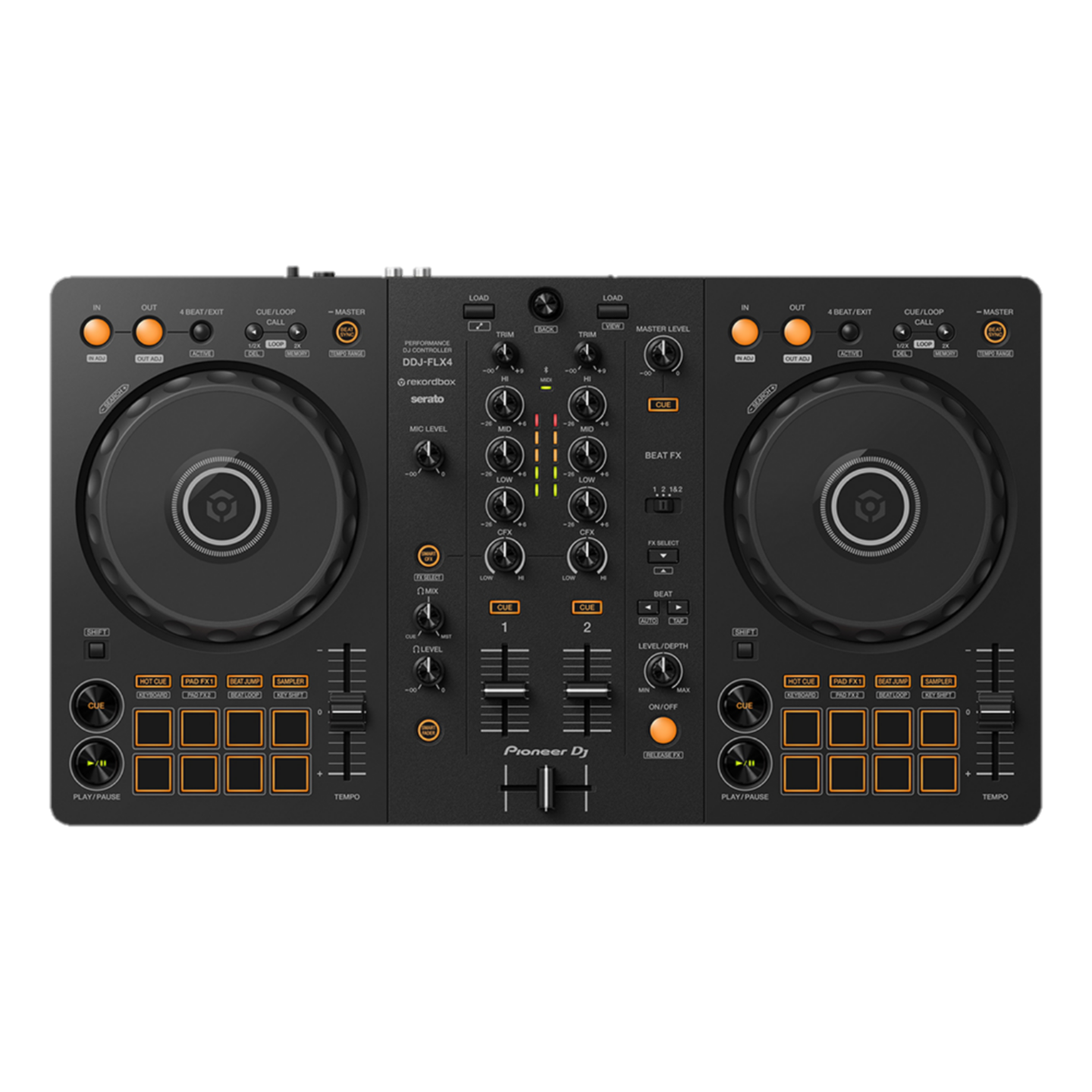
For most beginners, the controller is the centre of the setup. It gives you physical jog wheels, channel faders, EQ controls, cue buttons and performance controls while your music library and software run on the computer.
A two-channel controller is enough to learn the fundamentals. More channels and advanced controls can be useful later, but they are not a requirement for learning to mix well.
One example in the Music Hub catalogue is the Pioneer DJ DDJ-FLX4, a compact two-channel controller designed to work with DJ applications.

You can also compare options in the DJ Players and Controllers collection.
2. Laptop and DJ software
Your laptop needs to run the software supported by your chosen controller comfortably. Before buying anything, check the current software and operating-system requirements for the controller you want to use. This matters especially if you are using an older computer.
Organize your music library early. Clear playlists, consistent track information and cue points save far more time than hunting through folders while you practise.
3. DJ headphones
Headphones let you cue the next track before the audience hears it. For DJ use, look for a secure fit, enough isolation to hear your cue in a noisy room and a design that is comfortable when worn for longer sessions.
You do not need the most expensive headphones to start, but you do want a pair you can trust. The ability to hear timing and EQ changes clearly is more important than flashy extras.
4. Speakers or monitors
At home, you need some way to hear the master mix. Studio monitors, DJ monitors or suitable powered speakers can all make sense depending on the room and how the setup will be used. Keep the volume reasonable while practising; learning clean transitions does not require club volume.
If you are preparing for events, remember that a home monitoring setup and a PA system serve different jobs. Do not assume your small practice speakers are meant to cover a venue.
5. Cables and accessories
The unglamorous part of a DJ setup is also the part that can stop a session if you forget it. Check which cable connects the controller to the computer, how your controller connects to the speakers and whether your headphones need an adapter.
Useful additions can include a laptop stand, controller case or bag, spare cables and a power solution. Music Hub's DJ Accessories collection is a practical place to check what fits around the main setup.
Beginner DJ setup checklist
| What you need | Purpose | Beginner priority |
|---|---|---|
| DJ controller | Hands-on control of decks and mixer functions | Essential |
| Laptop + DJ software | Music library and software engine | Essential for laptop-based controllers |
| DJ headphones | Cueing and preparing the next track | Essential |
| Speakers/monitors | Hear the master output | Essential for home practice |
| Cables/adapters | Connect the system | Essential |
| Stand/case/bag | Ergonomics and protection | Useful later |
Three sensible ways to build your first setup
Minimal practice setup
Controller, laptop, software and headphones. This is enough to learn the interface, prepare tracks and practise many core skills without building a full room setup immediately.
Complete home practice setup
Add a pair of suitable powered monitors or speakers and the required cables. This makes it easier to practise the relationship between cue audio in your headphones and the master mix.
Setup with room to grow
If you already know you want to play events, consider protection for the controller, reliable spare cables and a practical stand. Build around portability and reliability rather than buying advanced equipment before you need it.
What should you practise first?
Learn phrasing and track structure before chasing effects. Practise cueing a track, matching tempos, bringing it in at the right point, using EQ to avoid frequency clashes and making clean transitions. Record short practice mixes and listen back. You will hear timing and level problems much more clearly after the session.
Common beginner mistakes
Buying too much too soon. A bigger setup does not shorten the learning curve. Get comfortable with two decks and a mixer layout first.
Ignoring music preparation. DJing is not only about hardware. Knowing your tracks and organizing your library matters enormously.
Using effects to hide transitions. Effects are creative tools, not a substitute for timing, phrasing and level control.
Forgetting compatibility. Check the controller, software, computer ports and operating system before committing to a setup.
Practising only visually. Waveforms are useful, but train your ears too. Cueing and listening are core DJ skills.
Frequently asked questions
What equipment does a beginner DJ need?
For a typical laptop-based setup: a DJ controller, compatible software, laptop, headphones, speakers or monitors and the correct cables.
Do I need four channels to start DJing?
No. Two channels are enough to learn the core skills and perform many styles of DJ set.
Can I learn DJing only with headphones?
You can practise many skills using headphones, especially on controllers that support appropriate cueing and master monitoring. Speakers make a home setup more natural, but you can begin compactly.
Do I need expensive speakers?
Not to learn. Choose speakers that suit your room and intended use rather than buying a venue-sized system for home practice.
Is the DDJ-FLX4 suitable for beginners?
Its two-channel layout and compact controller format make it a relevant model for beginners to compare. As with any controller, check current software compatibility and features against your own laptop and workflow.
How long does it take to learn DJing?
There is no fixed timeline. Consistent practice with track selection, phrasing, cueing, EQ and transitions matters more than trying to rush through features.
Where to go from here
Keep the first setup simple enough that you actually use it. Once the basic controls feel natural, you will have a much clearer idea of what you want to upgrade. Browse Music Hub's DJ Bundles or individual controllers and accessories to compare complete and build-your-own options.


![Christmas Gift Ideas for DJs at Music Hub Lebanon [2024]](http://musichub.me/cdn/shop/articles/christmas-gift-ideas-for-djs-at-music-hub-lebanon-2024_520x500_c11cd2f4-46b8-434f-8a1d-99e70fc6c13f_70x70_crop_top.jpg?v=1734614921)
![The Essential DJ Gear You Need to Get Started: A Beginner's Guide [2024]](http://musichub.me/cdn/shop/articles/the-essential-dj-gear-you-need-to-get-started-a-beginners-guide-2024_520x500_85c89513-c99b-437b-80a6-cbae7380e92a_70x70_crop_top.jpg?v=1734604703)
